Pages

Sunday, April 21, 2013

Assignment 10: Aerial Mapping with Balloon I and II

Balloon Mapping I conducted: April 1st, 2013.
Balloon Mapping II conducted: April 8th, 2013.

Introduction

Back in February we began the preparations for doing both aerial mapping with a balloon and a high altitude balloon launch.  The weather is finally beginning to resemble something like Spring, and so we are finally able to begin the aerial mapping of our campus.  This was a collaborative effort, and a learning experience for everyone, as nobody in the class, including the professor, has done aerial mapping with a balloon, nor georeferenced and mosaicked the imagery that resulted from such an endeavor.

We conducted balloon mapping on two different occasions.  The first event took place on April 1st, and was more of an experimental day to ensure everything was in working order and to work out any potential issues.  On April 8th we went out the second time, with great success.

Since I will be discussing both days in this single blog post, I will first examine the events of April 1st, then the events of April 8th, followed by a comparison of the two days in the conclusion.

Balloon Mapping I

Methods and Discussion

Upon arriving at class, everyone was instructed to split into groups and accomplish particular tasks.  Some were needed to fill the balloon with helium, others were to ready the camera rigs, and another group needed to measure and mark the balloon string so we would know how high the balloon was.  I worked with the group marking the balloon strings.  The professor had us mark every 50 feet, up to 400 feet (Figures 1, 2).  Each 50 was marked as black, each 100 was red, and the 400 mark was green and red.  These marks were intended to provide us with an idea of the height reached by the balloon.

While I was helping mark the balloon line, another group found a unique way to transport the large, heavy helium bottle from the second floor storage room, to the garage where the balloon was to be filled (Figure 3).  Once the lines were marked, we headed down to the garage to deliver the string and see how the filling of the balloon was going (Figure 4).

Figure 1: Amy and myself holding the string taut so I could mark it.
Amy walked the string back and forth while Beatriz and I marked it.
Figure 2: An example of a marking we made.  Red was used to
represent 100, 200, 300, and 400 feet (though 400 also had green).

Figure 3: An unconventional, but unique and effective way of transporting
the large, heavy helium bottle.
Figure 4: The filling of the balloon.  

When we arrived, they were finishing up with the filling process, and attached the string to the balloon.  With the string attached to the balloon via a metal ring and carabiner, and an eTrex GPS unit as well, we headed to the campus mall where we would launch the balloon.  Last minute checks were made to verify the was set to continuous shot mode and that pictures were being taken.  The styrofoam enclosure was then taped shut and the balloon was released (Figure 5).  As can be seen in Figure 6, the wind was very strong, and immediately pushed our balloon to the East, restricting its ability to gain altitude.  After walking it around the campus mall, it was reeled in and we returned to the garage to attach and test the HABL rig.
Figure 5: Professor Hupy attaching the eTrex GPS unit to the balloon before it
is released.

Figure 6: Picture of the balloon in the sky.  Though it is somewhat difficult
to tell, the balloon is pushed very far away and is not actually that high up.

With the HABL rig attached, the balloon was released in the campus mall area.  The class, eager to get some interesting pictures, decided to walk it over the bridge towards the Haas Fine Arts building.  Due to the strong, prevailing winds, the rig was being whipped around substantially, and at times the balloon was even being contorted (Figure 7).  The wind eventually caused the string to snap, resulting in the balloon rising, and the camera rig falling towards its untimely death (Figure 8).  With the class watching in horror, the rig splashed into the river, and everyone was suddenly glad the camera was in a waterproof case and the rig was intended to float.  Fortunately, not only did the rig land in the water, but it also landed towards the outside of it, resulting in it being pushed relatively close to the shore.  Our professor quickly navigated the snow covered, rocky slope to the rivers edge, grabbed a tree branch, and managed to snag the rig in a single thrust.  With rig in hand, our professor returned to a crowd of relieved students (Figure 9).
Figure 7: In this image you can see the balloon, rig, and string.  This image allows for
you to tell how far behind the balloon is from where we were walking.  The image may need
to be enlarged to see the string and rig.

Figure 8: The escaped balloon can be seen rising into the air.  Again, the
image may need to be expanded to see it, but it is directly above Hibbard (tall red brick building),
and in the middle of the gradient from light blue to dark blue sky.

Figure 9: Professor Hupy climbing back up the slope after grasping the
rig from the Chippewa River.

After returning to the classroom, our professor uploaded the photos from the first launch, along with the video from the second.  Figure 10 through 12 show some of the images obtained from the Lumix camera used in the first rig.  While a few of them turned out really well, most of them were unusable due to the angles or blurriness.
Figure 10: One of the usable images obtained. This is the campus mall area where
both balloons were launched from.

Figure 11: Thanks to the wind, the camera captured a cool image of both
the walking bridge and the Chippewa River.

Figure 12: Again, the wind provided an excellent photo of the new
Davies Student Center, and parts of upper campus.

Balloon Mapping II

Methods and Discussion

For this class period, the class split into the same groups in order to accomplish the tasks quickly, providing as much time as possible for mapping.  One new group was formed to take three different GPS units and collect ground control points for use in the mosaicking process.  As for the string, this time our professor wanted to increase its measured length so it could be allowed to go even higher.  We marked increments every 50 feet, up to 700 feet (Figure 13).  This time, the rig was merely a string cradle for the camera, with an arrow strapped to it and a fin attached (dubbed 'camarrow').  The arrow and fin act as a wind vane, pointing the camera in the direction of the wind, thereby increasing stability.  With the camarrow attached to the balloon (Figure 14), we headed to the campus mall, where it was quickly examined and then released (Figure 15).
Figure 13: Again, Amy is walking with reel of string while Beatriz and I hold the string
at opposite ends. This time we increased the range up to 700 feet, with increments every 50 feet.

Figure 14: The "camarrow" on its journey from the garage to the campus mall.
As you can see, the arrow is strapped to the camera using zip ties, and has a large
fin attached to it.  The allows the arrow to act as a wind vane, increasing the stability.

Figure 15: Professor Hupy assisting in the release of the balloon, after
students verified it was in continuous shot mode and was taking pictures.

The combination of having only a light wind and fin substantially improved the stability.  The lack of wind also allowed the balloon to rise mostly straight up.  The balloon was walked around a good portion of lower campus, and then taken across the bridge, around Haas, and into the parking lot between Haas and the Human Sciences and Services building.  As we were following the sidewalk back towards the bridge, we realized it was a bit risky to walk it with the balloon up, as several substantial tree branches reached close to Haas, making it a tight squeeze.  We decided to play it safe and reeled the balloon in to transport it back over the bridge (Figure 16).
Figure 16: A group of us helping unravel the twisted string as it is reeled in.
The balloon was brought down across the river by the parking lot by Haas.  We then
walked it across the bridge and released it back in the air upon reaching the other side.

As we were reeling it in, we counted the marks and found out the balloon had been over 500 feet in the air.  We then carried the balloon over the bridge, releasing it again once we were on the other side of the river.  We proceeded towards the hill to upper campus, taking the stairs once we reached it, and then walked to the big field next to Towers, which is where we reeled it in the final time.  This day's mapping resulted in 4846 images.  Figures 17 through 23 show a few of these.  Some of these images were then used to construct mosaics, as discussed in Assignment 9.  Unfortunately the collected ground control points were unusable due to their level of inaccuracy.  The professor intends to have students use Total Stations in the future to collect accurate GCPs.

Figure 17: Image of the Student Center (Center), McIntyre Library (upper right),
Schofield (lower right), and part of the new campus mall area.

Figure 18: Image of the walking bridge over the Chippewa River.
The single building depicted is the Haas Fine Arts center.

Figure 19: After walking around Haas and through the parking lot, we
began reeling the balloon in.

Figure 20: The balloon was released again upon returning to the lower campus
area, where we then headed towards upper campus.

Figure 21: We climbed the stairs to upper campus.  In the image are Hilltop (on left over road),
Horan Hall (Center), and Governor's Hall (Right).  A small portion of Towers Hall can be seen
in the upper left corner of the image.

Figure 22: This image was as we headed towards the large open field next to Towers Hall.

Figure 23: The balloon is now over the field next to Towers Hall (bottom).
The sand volleyball, tennis, and basketball courts can also be seen.

Comparison and Conclusion

Both balloon mapping exercises were an excellent experience.  Everyone learned a lot and most, if not all, thoroughly enjoyed it.  The first exercise turned out to be mostly for working out the kinks, which was definitely needed.  With it being everyone's first time, it's unlikely for everything to go smoothly, and complications were expected.  The wind was particularly strong the first time, which we now know from experience that it can greatly impact the outcome.  With winds as strong as they were, a kite would have been more useful, and our professor intends to look into them for future classes.   An accurate set of ground control points are definitely important to assist in the georeferencing and mosaicking process.

There were substantial improvements across the board in the second exercise.  With the same people performing the tasks, they were completely faster, allowing more time for collecting imagery.  After seeing the effects of the wind in the first exercise, we realized the necessity to increase stability as much as possible, leading to the concoction in the second exercise that worked very well.  Whereas in the first exercise about 320 images were collected and a video, the second exercise resulted in 4846 images.

Overall, I found the balloon mapping exercises to be very useful and fun as well.  I can see many useful applications for this cheap method of obtaining high resolution imagery.

Sunday, April 14, 2013

Assignment 9: Georeferencing and Mosaicking

Georeferencing and Mosaicking conducted between: April 8th and April 15th, 2013.

Introduction

This week's blog post will discuss the georeferencing and mosaicking process that took place after obtaining aerial imagery from a balloon mapping rig.  Explanation and discussion of the balloon mapping process will be posted in a blog next week.

Through the balloon mapping process we obtained nearly 5000 images of the University of Wisconsin - Eau Claire campus.  Very few of these images were selected for the mosaicking process, as some of the images were blurry or excessively similar to the other images, as photos were taken every second.  The campus was broken into six areas, one for each group in the class, with three students in each group.  It was then up to each group to georeference images in that area and create a mosaic.  Each group would then place their mosaic in a geodatabase for everyone to access.

Georeferencing

Before beginning the georeferencing process, there are a couple bits of information that are necessary to understand.  First, is the RMS error. The error, as described by ESRI in the ArcGIS Help file, is the difference between where the point ended up as opposed to the actual location that was specified.  The total RMS error describes the consistency of the transformation between control points, with greater consistency as you approach 0.  This does not mean that a georeferenced image with an RMS error of 0 is perfect, as the accuracy is dependent on the control points, and, therefore, if poor control points were selected then accuracy may still be poor.

Another important factor in georeferencing is the use of transformations.  A transformation allows a raster dataset to permanently match the map coordinates of the target data, and there are multiple options to chose from.  My group chose to use a second-order polynomial transformation, as this seemed to provide the most accurate image.  A polynomial transformation is built on control points and a least-squares fitting (LSF) algorithm.  The LSF algorithm intends to derive a general formula that can be applied to all points, which often results in slight movement of the control points.  A second-order polynomial transformation requires at least 6 control points to use.

The best way to georeference images would be to have ground control points taken with an accurate GPS.  A few members of our class did this while everyone else was with the balloon.  However, at the time of data collection the group was unaware that the balloon would be going to upper campus, and so ground control points (GCP) were not collected there, which is the area my group was designated for georeferencing and mosaicking. (In the coming weeks we may use a Total Station to obtain ground control points on campus.)

For the time being I will be using a reference image and using objects in the image, such as sidewalks, pavement, and intersections, as control points.  In Figure 1 you can see some of the points I used to georeference the image.  As can be seen, buildings would be difficult control points to use, since the angle of the camera greatly affects how much of a building you can see.  This makes the mosaicking process particularly difficult at times when you are trying to put images together that have varying angles of the same building.

The georeferencing itself is rather simple.  Merely click the add control points button on the Georeferencing toolbar, then click a spot on the map where a control is desire, and then click that same spot on the reference image.  Each control point made shows up in the Link window, showing the RMS error for each individual control point created.  Once all of the desired control points are created and the image is satisfactory, the information can be saved with the image by clicking on georeferencing and selecting Update Transformation.  Alternatively, the image can be rectified, which creates a new image and permanently applies the transformation to it, which is what I did.

My first time going through my chosen images and georeferencing did not go over quite so well.  For some particular reason I was not thinking clearly and I used the tops of buildings in the balloon image and referenced them to the tops of the buildings in the reference image.  As is likely obvious to those reading this, that is a very poor method to use.  This may be fine if the image is from directly above the building, but in our images only Hilltop (the building that goes over the road) could be used for this.
Figure 1: This is the first image I georeferenced, corrected and not using the tops of buildings for control points.
The red circle on the image shows where the Total RMS Error is located.  The red line delineates
the transformation method used.  All of the control points can be seen in the image, represented
by the green and red crosshairs with a number above them.  
As shown in Figure 1, I used 18 control points for the image, which is three times the number required for a second order polynomial transformation.  Though only six are required, earlier on I managed to obtain a total RMS error of around .5 using only six control points, but the image was way off.  I found that my best images had between 12 and 20 control points, and I would recommend at least 12.

Figure 2: The second image I georeferenced.  Again the RMS is circled and the transformation is
underlined.  The image is really far off on the top right, but that was intentional.  For this image I
focused the accuracy at the bottom of the image, as this one will be underneath when mosaicked. 
I was in a hurry when doing the mosaicking and forgot to take screenshots of the other four images used in the mosaic, but the process was the same.  I tried to ensure that each image had at least 50-60% overlap, and each one focused (was most accurate) on a different area.


Mosaicking

The mosaicking procedure was relatively simple as well, yet somehow managed to turn into a pain, as there seemed to be issues, either with the server or with my ArcMap session (or perhaps me).  To mosaic the images, I simply ran the Mosaic to New Raster tool.
Figure 3: These are the settings I used when running the Mosaic To New Raster tool.

Yet again I failed to take screenshots, this time of the errors/issues that occurred.  Hopefully I will learn from this and remember that whenever I encounter an error message or the result is not what is expected, I will take a screenshot for proof, discussion, and potentially determining the reason for the error.

The mosaic of my images can be seen in Figure ?. There are several discrepancies with my mosaic.  One is that the rope can be seen in multiple images.  Given the number of images we obtained, it is definitely possible to use enough images to not have the rope in the image; however, it would take me a considerable amount of time, of which I have been unable to find.  Hopefully in the near future I will be able to return to the images and create another mosaic without the rope.
Figure 4: My mosaic based off of four images.

While I was mostly covering the road up the hill, Horan Hall, and Hilltop, my group members were focused on the other areas of Upper Campus.  Once each of us finished our individual mosaics, we then mosaicked all of ours together, to be placed in an open geodatabase for the whole class to access.
Figure 5: Our group mosaic of Upper Campus.

Conclusion

While the process was interesting at first, it grew tedious towards the end.  This may have been partly due to the fact that I realized the mosaic would not (and did not) turn out as great as I had hoped.  Given the amount of imagery I think it could certainly be done much better, and hopefully sometime in the near future I will have the time to come back and try again.  It also would have been more enjoyable had there not been repeated issues with the creation of the mosaic.  As is likely apparent after reading this post, this particular assignment was challenging in spots, and I hope to be able to come back to these images and turn them into a better mosaic.

Monday, April 8, 2013

Assignment 8: Navigation activity using GPS and Map

Exercise conducted on: March 25th, 2013.

Introduction

This blog post discusses the final navigation exercise and compares it with the prior three weeks. This week the field experience was a bit more intense, mostly due to the incoming fire. While combining what was learned over the last few weeks in navigation, we were also provided paintball guns to combat the other teams. The goal for this week was to collect as many of the fifteen points as possible, in any order. We were in the same groups as before, making six teams total. The weather finally decided to cooperate, as it was sunny and in the upper 30's (Fahrenheit), though there was still a substantial amount of snow on the ground.

The Methods section of this post will discuss the events of this week. In the Discussion section I will compare the experience of this week with the past ones, recap what was done in the three prior weeks, and discuss the important items learned.


Study Area

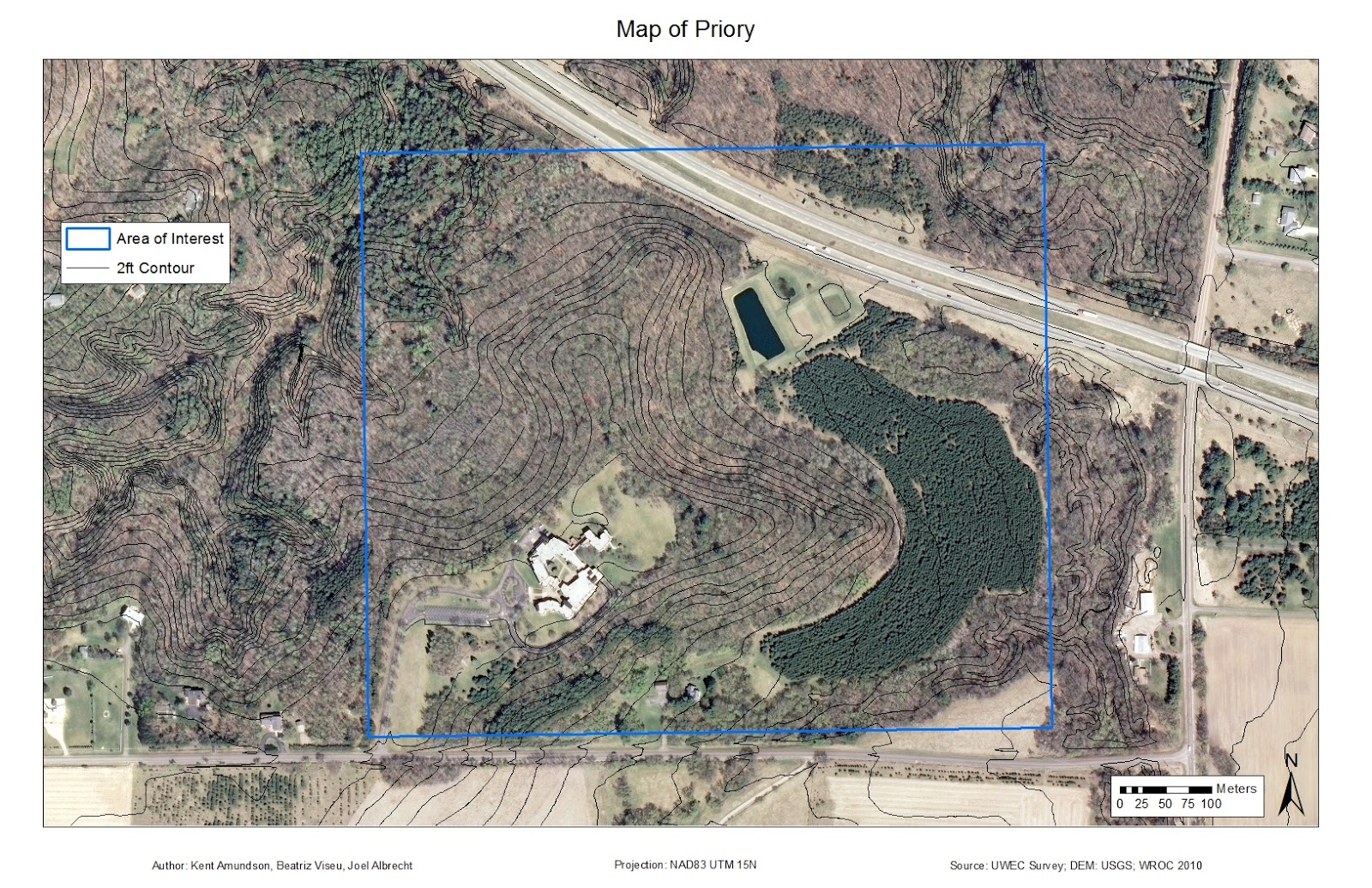
The area of interest in our field navigation exercises has remained the same over the last three weeks. The exercises were conducted at the Priory, a 112 acre, mostly wooded area purchased by the University of Wisconsin – Eau Claire in 2011, and located just outside of Eau Claire, Wisconsin. The monastery located there is now a daycare and nature center for children.
Figure 1: Map showing the area of interest at the Priory.  All course points are within this boundary.

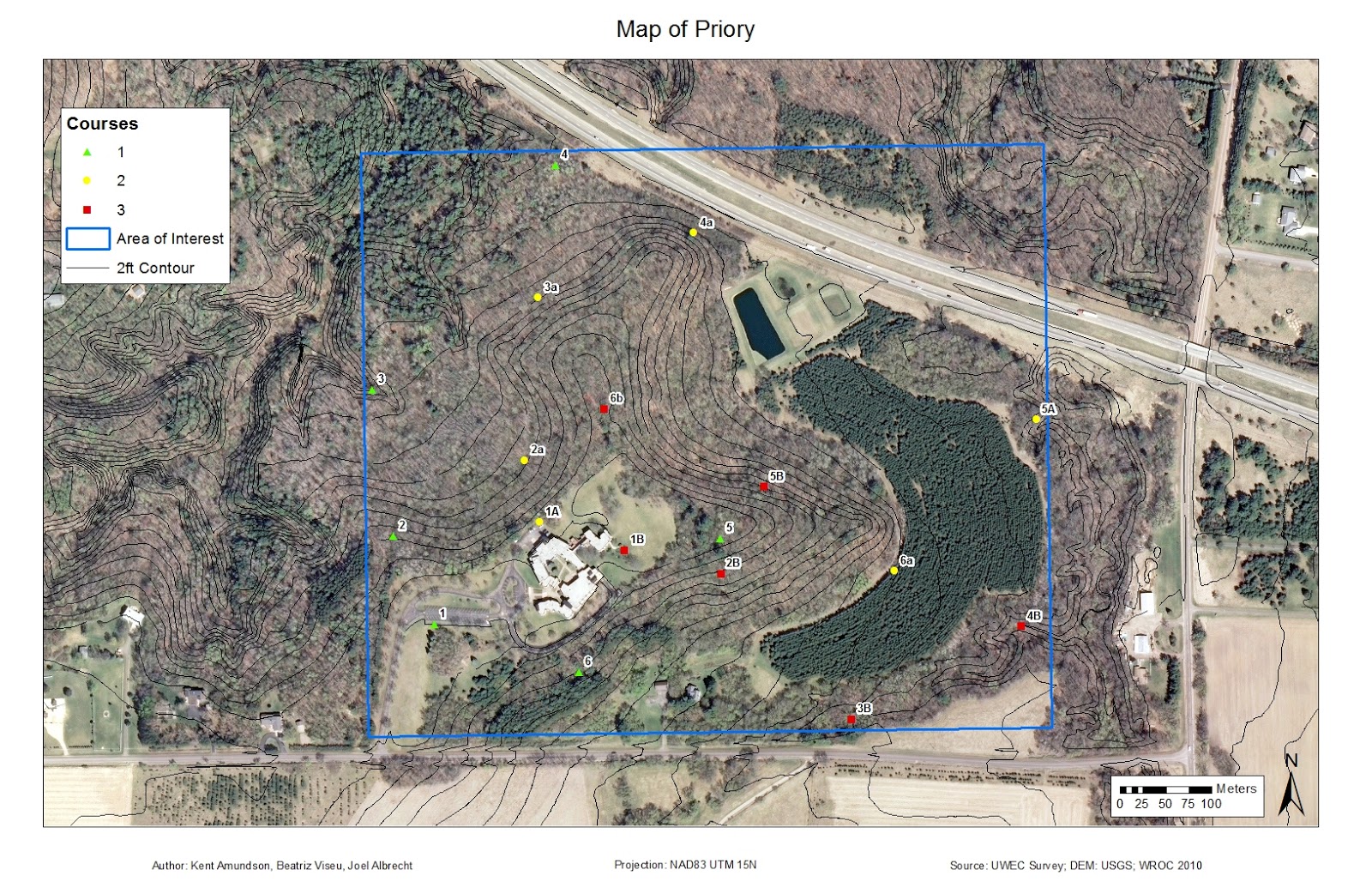
Our professor created three navigation courses on this property, with some overlap in them to make it more difficult and ensure students are using the proper methods to find the markers (Figure 2). Each course consists of five points with an orange and white marker at each point.
Figure 2: Map showing all of the course points and the course they belong to.
The area of interest is included as well, for reference.

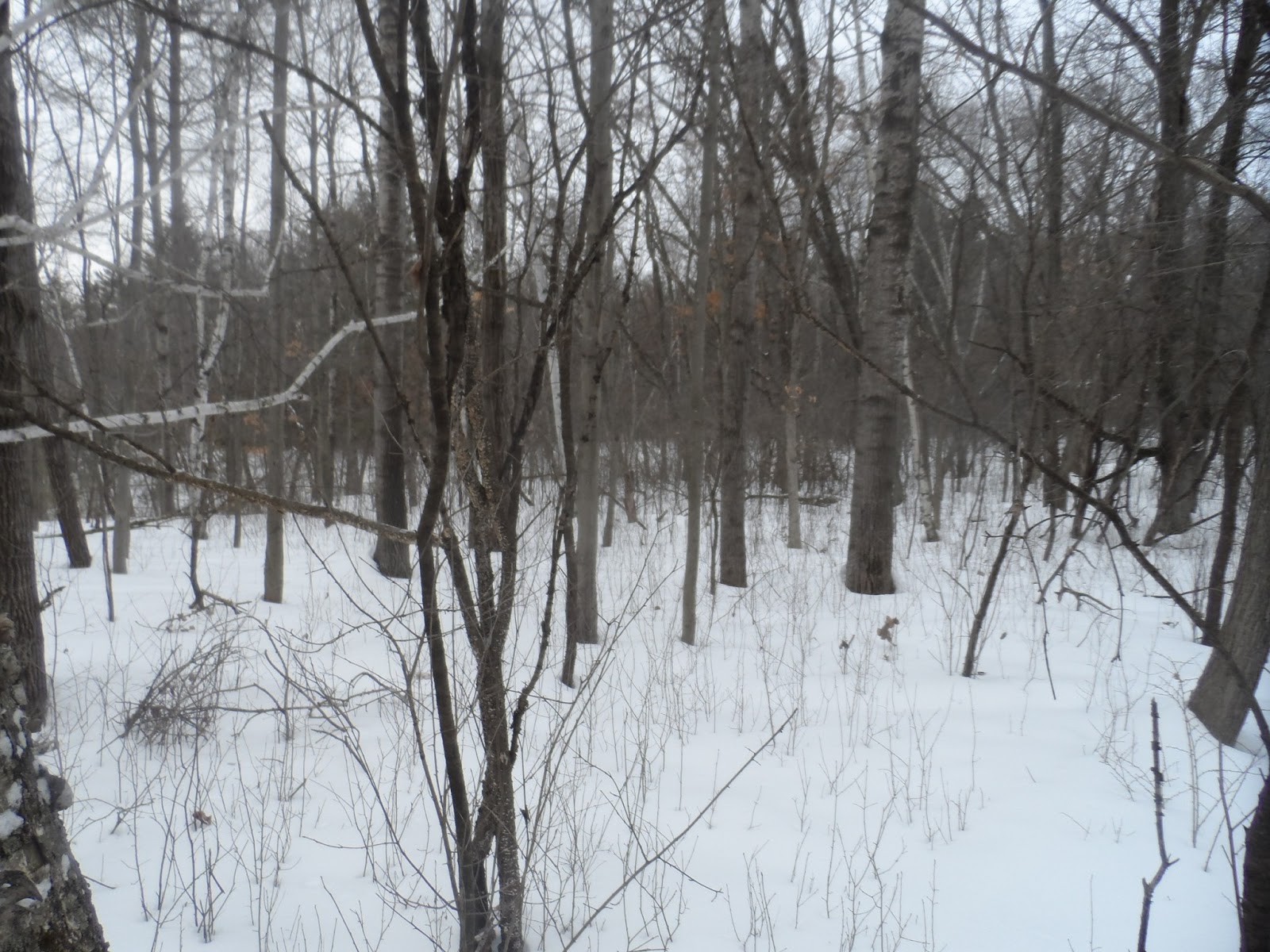
All exercises took place in the month of March, which in Wisconsin can have quite variable weather. This year the weather was bleak, as we multiple snow storms and for the most part the temperature remained below 40 degrees Fahrenheit. The snow storms seemed to always come on the weekend prior to our Monday expeditions. All three times that we were at the Priory the snow ranged from ankle to knee deep, so wearing the proper clothing was necessary to stay warm (Figure 3).
Figure 3: The snow covered terrain that we had to navigate all three weeks.
It ranged from ankle deep in some spots to knee deep in others.

Methods

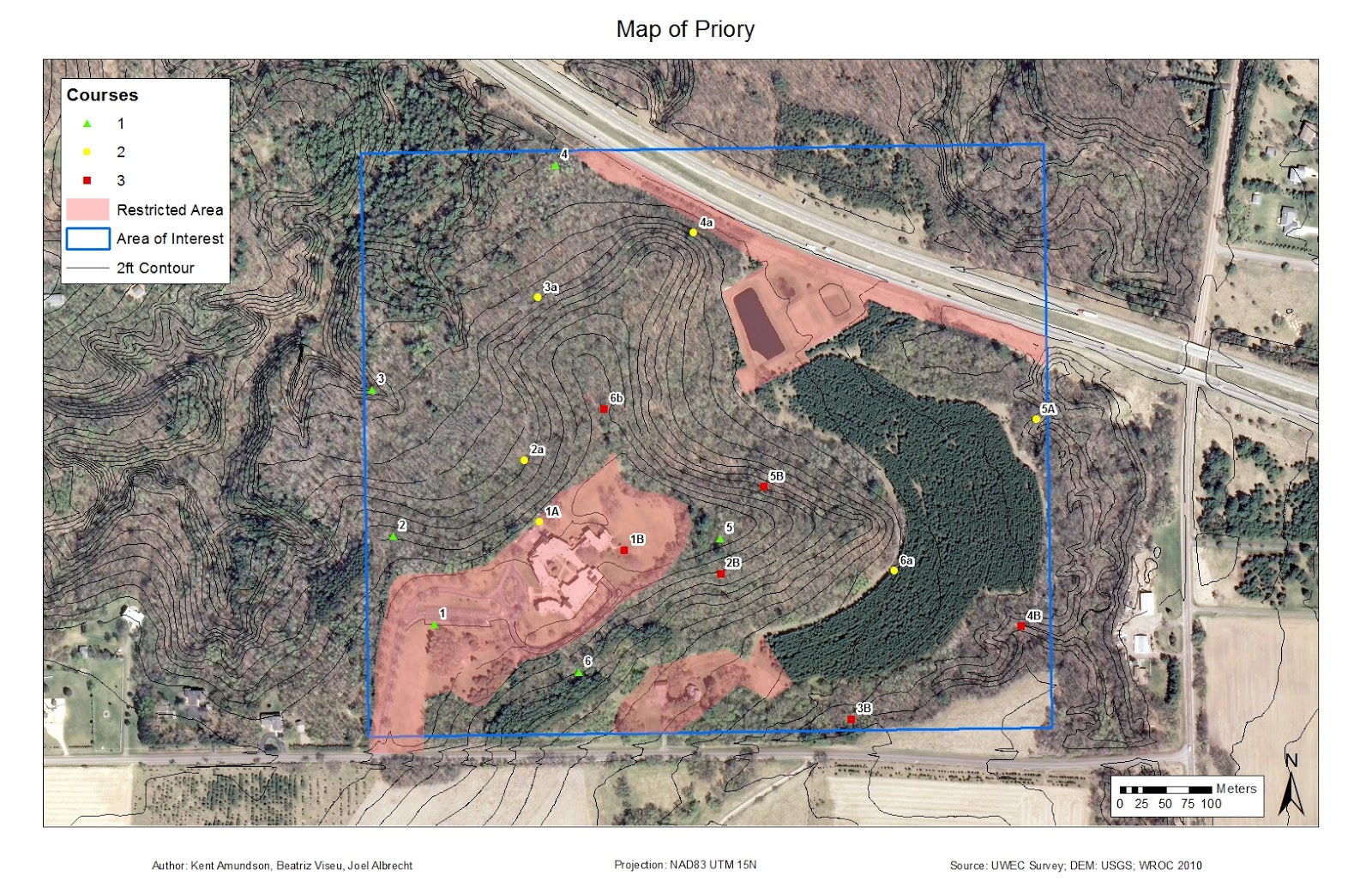
We arrived at the Priory to see 18 Tippman A-5 paintball guns lying on the pavement with full hoppers and CO2 (Figure 4). We were each instructed to grab a gun, a mask, and fire off a few shots to get a feel for the gun for those who haven't paintballed before, which was only a couple people. Snowshoes were also available to those who wished to use them. I chose not to since we were paintballing, as I didn't want to be restricted on movement and I felt they would limit my agility. Each person was also carrying a Garmin eTrex GPS unit, again. We were instructed to keep a track log (set to take a point every 30 seconds) and to mark a waypoint at each marker. The paintballing rules were that if any member of your team was hit, the whole team had to sit out for 2 minutes. Also, we were required to stay away from all buildings and open areas, as is shown on the maps we created for this week (Figure 5).
Figure 4: The Tippman A-5 paintball gun.
Figure 5: Map of the restricted areas, in relation to the course points and area of interest.
The top one was restricted due to visibility from highway.  The left area was due the presence
of many small children, and the area on the bottom center was a private residence.
My group decided to head for the points on course one and two first, as they were closest to where we were starting. There was a five minute no shoot at the start so that there wasn't a ton of shooting right around the starting area, which allowed us to get the first point with no issues. Shortly after leaving the first point we heard shooting slightly to the southwest of where we were heading. We headed straight for the marker in the ravine that we had issues with during the first navigation exercise. As we approached we saw that another team was across from us standing on the other ridge. After about five minutes of shooting back and forth we made a truce. It was difficult to hit anyone with all of the brush around, the paintballs kept breaking on the branches. Given the steepness of the ravine, it was decided that I would take both Joel and Beatriz's GPS units down with me so I could mark the waypoints, while they stayed on top to provide cover fire if necessary. I then slid down into the ravine and proceeded to mark the points. Just as I was finishing, Joel shouted down to me that another group was coming towards us. I decided to follow the ravine a ways so that I wasn't sitting in the open for the other team. While the ravine was fun and easy going down, it was quite the opposite on the way up, especially when two members of the other group spotted me on my way up. Luckily our professor had the PSI turned up on the guns, as this made the guns even more inaccurate at longer ranges. I took cover behind trees when necessary, but I was able to make my way back up in bursts. Once I regrouped with my team we headed on to the next points, keeping an eye on our backs for the other team.

As we continued on we gathered more points and had a few more skirmishes. Unfortunately, the masks we were using kept fogging up, which was rather frustrating at times and heavily limited sight. Towards the end of our exercise we saw two groups fighting each other and decided we wanted to flank them and see how much damage we could do. As we made our way towards them, someone spotted us and two of them broke off to engage us. After a short firefight, some of us ran out of ammo while others realized how low they were, so we formed a 9 person group and began heading back towards the starting point since it was getting towards the end of our time.

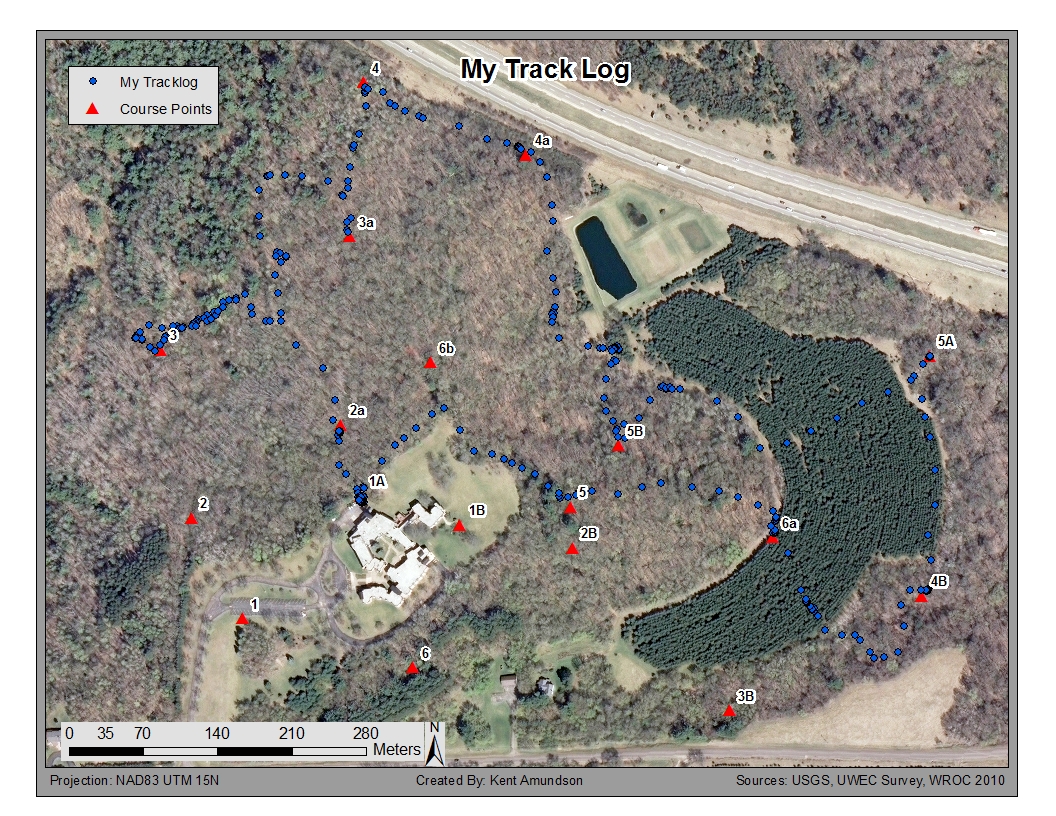
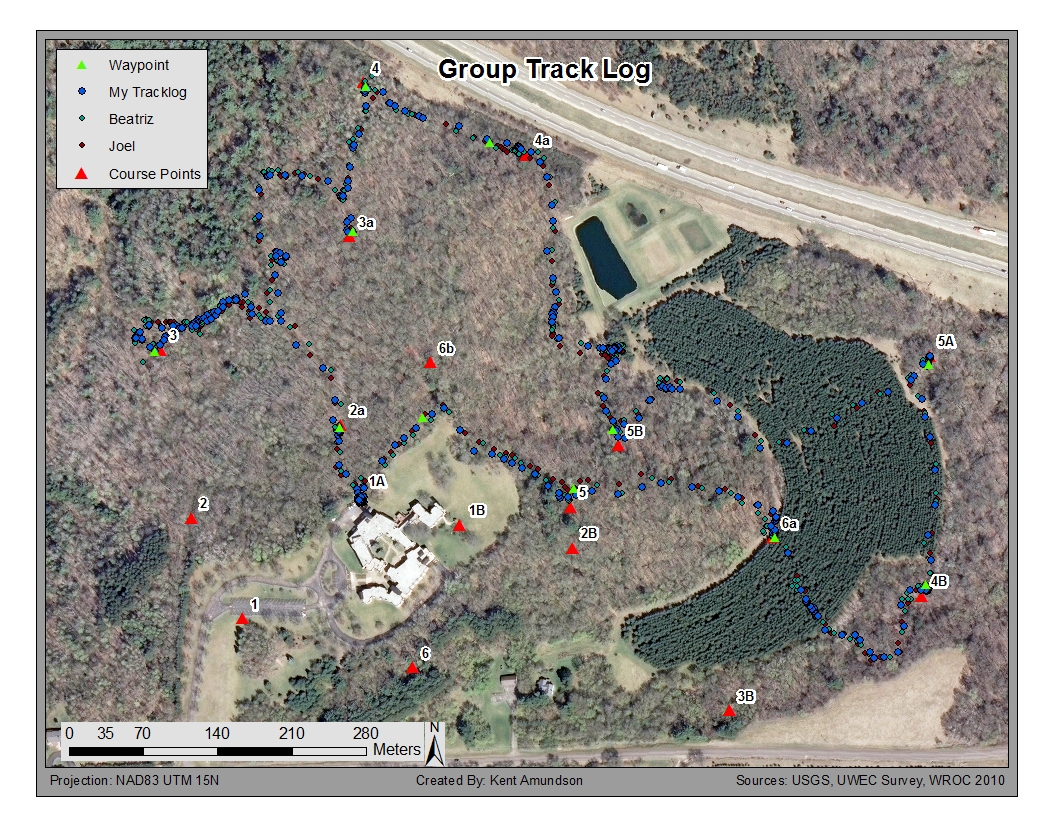
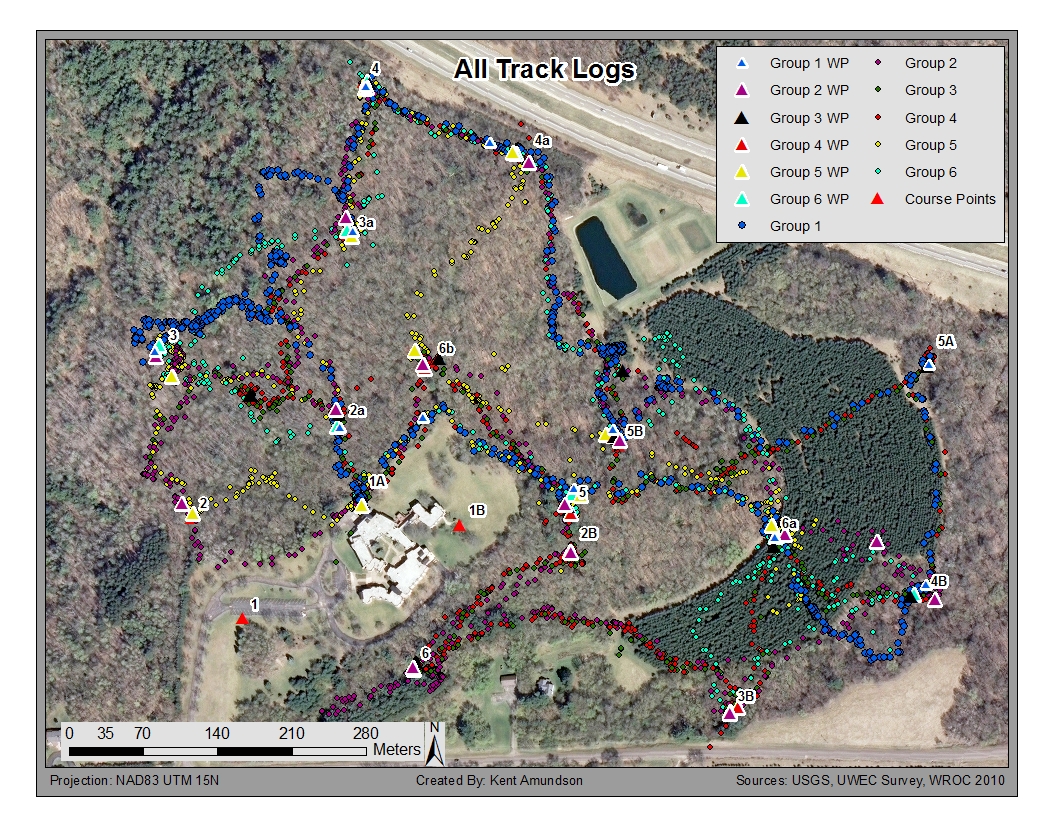
After the exercise, we had to upload our track logs and waypoints into ArcMap and place them in a public folder for everyone to access and create maps with, again. Figures 6 through 8 show the maps I created of the exercise. When looking at just my track log in Figure 6, you can see the locations that firefights occurred, as there are many dots in a small area.
Figure 6: This map depicts the path I was took in navigating the course markers.
Areas with a greater point density are where shootouts occurred.
Figure 7: This map shows the track logs of all three group members.  Since I was carrying all three GPS
units after the first encounter, differences in position are mostly due to the positional accuracy of the
GPS unit, along with the track logs being started at different times.
Figure 8: This map shows the track logs and waypoints collected by each group.


Recapping Prior Weeks

Week 1
During the first week of our land navigation exercise we created a topographic map (Figure 9) using ArcMap and established a pace count, both to be used for the second week. All of the following data was provided for us by the professor: a digital elevation model (DEM) obtained from USGS, orthographic images obtained from the Wisconsin Regional Orthophotography Consortium (WROC) in 2010, and two foot contour lines that were surveyed by UWEC during the purchase of the Priory.

The pace count was merely walking in a straight line for 100 meters and counting how many times you step with your right foot (starting with your left foot). We did this three times to determine consistency, and the best person was to be the pace counter for the exercise in week two. The counting would be slightly different at the Priory, given the change in elevation, but for our purpose this was relatively minor.
Figure 9: This is the map chosen by our group, for use during the first field navigation
exercise conducted at the Priory.

Week 2
The second week of our exercises involved navigating the Priory with a map and compass. The map we created was printed and course marker locations were given to us in UTM coordinates. We then plotted those points on the map and received a short briefing on how to use the compass and how to determine bearing. Once the briefing was completed, we found the bearings to get to each point and headed outside to start the course.

This week was particularly frustrating for my group. While we found the first point with no issues, the second point tricked us. We did, however, learn an important lesson: always trust the compass. While the point didn't look like it was down in the ravine on the map (due to not using the 2-foot contour lines), it was, and had we just continued following our compass down we would have seen it. We spent at least 30 minutes searching for the point before our field supervisor found us and moved us onward.

Week 3
In the third week we used a Garmin eTrex GPS unit to navigate another course at the Priory. Again we were provided UTM coordinates for the markers, only this time on a different course. This time the navigation was quick. Initially we paid close attention to our UTM coordinates on the GPS, and walked in the direction that would make the numbers get closer to those on our sheet. After the second point, Joel found out how to create a waypoint with the GPS, which then displayed an arrow on the screen in the direction we needed to go and the distance we needed to travel. The course was easy from then on, with the exception of the terrain and snow up to our knees. We completed the whole course in just over an hour, which is about how long we spent on just two points in week two. With track logging on our GPS unit we were able to create a map showing the path we took (Figure 10).
Figure 10: This is my group's track log for week 3's course navigation.

Discussion

This week's exercise was definitely the easiest, mostly because we hardly needed to use our GPS or map to find the markers. Since this was the third time we had been in the field, we knew the first two courses and the point locations quite well, so the only time we really needed to use our GPS was for the points on course three.

These land navigation exercises were an excellent learning experience. Not only did I acquire new skills, but I also learned from the mistakes that were made throughout these four weeks. In the first week my group found out the importance of trusting your compass. Had we trusted it, we would have found the point much quicker, and would have been able to move on and collect more points. We chose to trust our map more, but unfortunately the DEM used to create the map wasn't made with a low enough interval. This resulted in the marker appearing as though it was on or near the ridge. When looking at a map that used 2-foot contour lines, it was obvious that the flag was in the ravine.

Another important lesson learned was how the compass, when used properly, can be just as accurate (if not more so) than a GPS. The positional dilution of precision (PDOP) can be affected by canopy cover, buildings, and the atmosphere. Given that we were in a forest, the PDOP could vary. We were in this area in winter, when there is little canopy cover. In summertime, when the trees are in full bloom, the PDOP would likely be reduced due to the increased cover. Despite navigation by compass being much slower, it is always a good idea to carry a compass, just in case your GPS battery dies, or worse.


Conclusion

While navigation by map and compass is by far the slowest, it can still be fun and a good secondary option in case of equipment failure. A map with satellite imagery and contour lines can give a good idea of the type of terrain that will be covered, allowing for more suitable paths to be found, and also show landmarks and vegetation of the area. Even though paintballing was mostly just a fun addition to the exercise, it also required people to be pay closer attention to their surroundings. When using the GPS, it was easy to just put a waypoint on the GPS and walk in the direction of the next marker. With everyone armed, it encouraged people to constantly be looking around, taking in the environment.

As can be seen, these exercises have produced multiple skills and experiences that can be applied to both a professional career and outdoor hobbies. This post brings an end to the land navigation exercises conducted over the last four weeks.

Monday, March 25, 2013

Assignment 7: Navigation with GPS

Exercise conducted on: March 11th, 2013.

Introduction

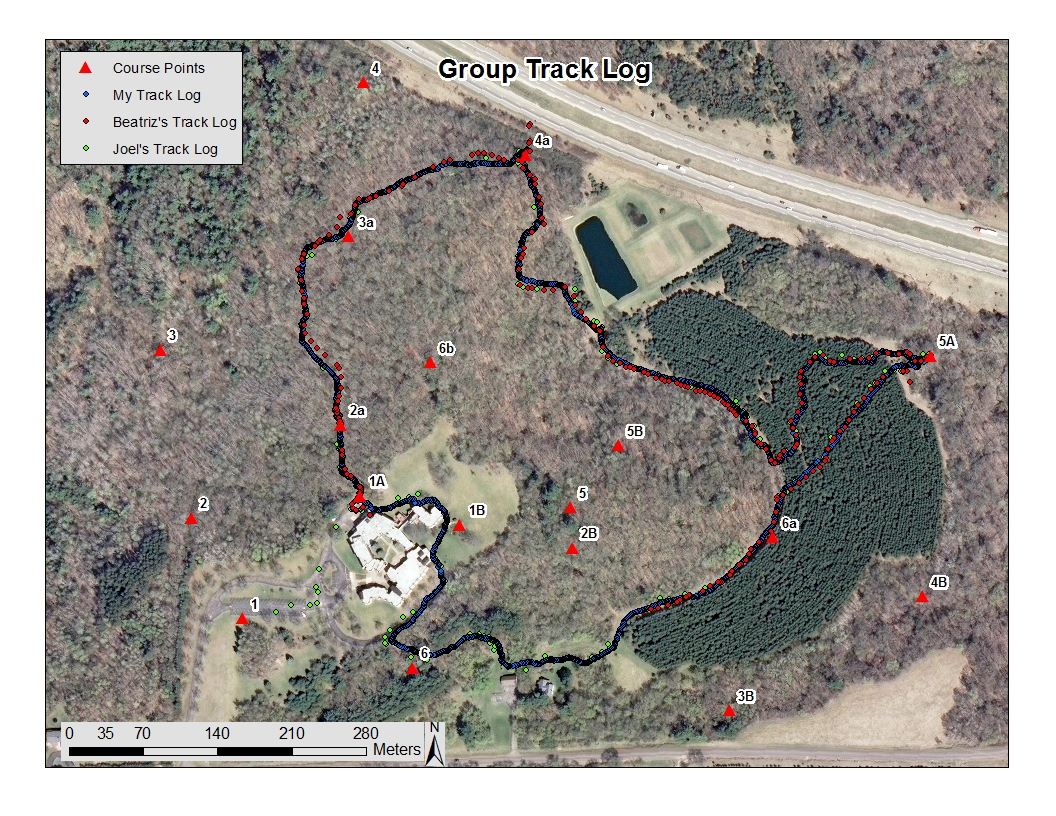
Again, we were at the Priory for our field exercise. And again, the weather decided to dump even more snow on us the day before and of our field navigation. Whereas last week we navigated the course with a map and compass, this time we navigated only with a GPS unit. We also rotated courses, so that no group did the same course a second time, as they would already have a general idea of where the points were. Armed with a Garmin GPS, we were to navigate the course while recording a track log, which we would upload once back in the lab. Once we uploaded the data, we were required to create three maps: One with only our track log, one with the track logs of our whole team, and one with everyone’s track log.


Methods

Upon arriving at the Priory we were issued our Garmin GPS units and our course number (Fig. 1). While waiting for our final group member to arrive, we were given a short introduction on how to use the Garmin eTrex GPS unit. After about five to ten minutes of waiting we were instructed to start our endeavor, and our final group member would have to catch up with us. We went to our starting point and began to figure out how the UTM coordinates changed as we moved around the area.

Figure 1: Garmin eTrex GPS unit we used to conduct our exercise.
As mentioned in a prior blog entry, a Universal Transverse Mercator (UTM) zone is a 6 degree longitudinal section of the Earth with a meridian down the center (there are a total of 60 UTM zones). For example, our mapping area is in UTM zone 15N, which has a longitudinal range of 90-96 degrees West, with the meridian being at 93 degrees. The N refers to being north of the equator (S indicates south). To remove negative values, a false easting is applied.

So, as we walked around we noticed that when heading north, the northing increased, and when heading east, the easting increased. Since the two numbers were not labeled on the GPS, it was easy to forget which number was which. For this reason, we decided it would be easiest to match one number first, and then match the second. This resulted in us walking slightly greater distances since we wouldn't be walking straight towards the target location.

After figuring out our GPS, it was time to head to our first point. Moving down the hill was interesting with the amount of snow and the way it accumulates on the hillside. With every step down we would be up to our knees or higher in snow. This made the pace slow quite slow, and it didn't take long to become tired and out of breath.

A few steps after we found our first point, Beatriz and I heard people coming down the hill behind us, following our tracks, so we stopped and waited to see who it was. It turned out to be our missing group member, Joel, who was late due to the original vehicle they were going to drive to the Priory being stuck in their driveway due to the snow. With him was Drew Peterson, who realized when they found us that his group was going on the same course, but going in the opposite direction. So, rather than run and try to catch up to a group 20 minutes ahead, he decided to stick with us.
Figure 2: Drew in snow up to his knees. This is what we had to walk through
for the vast majority of the exercise. The only respites from this depth of snow were
paths of other students and a road that is on part of the Priory.
Figure 3: This is an image of me monitoring our UTM coordinates as we navigate
from one point to another. As can be seen, I too have been in snow
up to my knees. 

After we found our second point and were taking a short break, Joel started playing with his GPS and noticed that he could set waypoints. He set a waypoint for our third point and found out that it would draw a line to that point and give the distance and direction to the point. This provided for a more efficient mode of travel, and didn’t require us to pay as close attention to our GPS unit. We decided to use this for the remainder of the time since we all understood how to use the UTM coordinates for navigation, and we would conserve time and energy.

Figure 4: Beatriz taking a short break and comparing the UTM coordinates of her GPS with mine.
We found that despite only standing about 1 meter apart, our GPS differed by 10m
in northing and 6m in easting. 


Figure 5: Joel entering our next waypoint. 
This made our travel substantially more efficient. 
After locating all of our points, it was time to head back and upload our GPS data to ArcMap and create maps of our travel. To upload the data I had to connect the GPS unit to the computer via USB, and then extract the data using DNR software. From there I was able to export the points as a point shapefile. I then created a file geodatabase in ArcCatalog so I would be able to use ArcMap to export the shapefile data as a feature class. Once completed, I then projected the points, which were in WGS 1984, to NAD83 UTM Zone 15N. We then emailed our file locations to our professor so he could import every students feature class into a dataset. When all of the students finished this part, we were able to begin creating the maps. The first map is only the track log from my GPS. The second map contains the track logs of everyone in my group (Beatriz, Joel, and myself), and the final map includes the track logs of everyone in the class.


Figure 6: This is the track log of my GPS, showing my path of travel through Course 2. My path
almost appears to be a solid line, when in actuality it is over 4000 points. I failed
to check the settings on my GPS, so it was set to track my location every second.
This resulted in my track log being 47% full and battery depleting over 50%,
all in less than 2 hours.
Figure 7: This map shows the track logs of my whole group. The map makes it apparent that
each of our GPS settings were different because the interval between points is
different for each of us. The map also shows the variance in positional accuracy,
as our points do not always match up. At the top of the map at point 4a, you can also
see that Beatriz's GPS shows her as being almost on the shoulder of the highway,
which she obviously was not.
Figure 8: This map shows the track logs of everyone in the class. Rather than having 18 different colors
showing the track log of each individual, I chose to place everyone into their respective
groups and make their symbols the same color. 
Discussion

It was immediately apparent how much of a difference a GPS unit can make. Without a GPS we had to spend time using a map to find the bearing to the next point, have one person always walking ahead and lining them up with the bearing, and we needed to count our pace in order to have an idea of the distance we traveled. With a GPS, each of us could merely walk and monitor the UTM coordinates on our GPS. Once we found the that we could set waypoints, it became even easier since all we had to do was follow the arrow and it counted down the distance to the point. This time we didn't have any difficulties finding the flags because we were lead practically right to them, whereas last week we didn't complete the course because we didn't have full trust in our bearing and didn't keep track of our pace well. Given how difficult it was to traverse the terrain, even on a level surface, it was nice to be able to just set a waypoint and follow the arrow.

The discrepancy between the number and accuracy of points collected by each GPS is apparent in the Group Map (Figure 7). The number of points was due to the fact that we forgot to examine the settings on our GPS, and so each of our GPS's were collecting points at a different rate. My GPS, it turns out, was tracking the location every second, which explains why I had over 4000 points and it almost looks like a solid line. Joel and Beatriz had less than a quarter of the number of points as I did. This is an important lesson. In a matter of 2 hours, my batteries depleted almost 50% and my storage was 47% full, whereas the other two were less than 5% full and didn't use up anywhere close to as much of the battery. Since we were all walking in a single file line, all of the points should be on top of one another. Unfortunately, GPS are not that accurate, as is demonstrated by the map. Since we were walking in a forest, the dense vegetation and tree canopy assisted in hindering the positional accuracy.

By looking at the map of all track logs (Figure 8), you can see that the other groups did not check their settings as well. It can also be seen that everyone followed relatively direct paths, as the curves in a path were mostly the following of the terrain for ease of travel.


Conclusion

Much to our delight, this exercise went much smoother than the week prior. We completed the course in under two hours without a single issue, substantial improvement over last week. However, as shown, a GPS has issues of its own. It requires batteries, has many settings that must be checked to ensure appropriate data collection, and its positional accuracy can vary depending on environmental factors. For this reason it is important to plan ahead and have at least a one other method of data collection available, in case the primary fails, has issues, or is confiscated by Customs.

Monday, March 11, 2013

Assignment 6: Navigation with Map and Compass

Exercise conducted on: March 4th, 2013.

Introduction

This week we had to meet at the Priory, a 112 acre area recently purchased by the University. The maps we made last week were printed out and provided to us upon arrival. The intent of this week's assignment is to learn how to use a map and compass to navigate. Though it was not snowing or raining this time, we still had knee-deep snow to walk through for much of the trip.

Methods

Upon arriving at the Priory, we were instructed to go inside and gather our maps. We were then given a sheet of paper with UTM coordinates on them. The coordinates corresponded to the course we were going to be on. The professor had designed three navigation courses, each with six points. My group was assigned to the first course, and so those were the points we plotted on our map (Figures 1-3). Once each of us plotted our points we were given a briefing on how to use a compass and determine bearing.

Figure 1: Me, plotting our course markers on a map.  We were given a sheet of paper
with a list of each course and the respective UTM coordinates.  
Figure 2: Joel comparing his points on the map with mine, to verify that we each have our
points place correctly.  Two points were placed incorrectly, so it was good that we
compared our maps, otherwise we would have had to fix it in the field.
Figure 3: Beatriz finding the bearing to each point on the map.

When it comes to using a compass for navigation, it is important to know azimuth as well.  The azimuth, or bearing, is an angular measurement based on a circle, and is measured in degrees.  On a compass, North is 0 degrees (or 360), East is 90, South is 180, and West is 270.  Magnetic declination would be taken into consideration, however, Eau Claire, Wisconsin is incredibly close to zero declination.  The compass would then be placed on the map, with the travel arrow parallel with the intended path.  Then, the compass housing is turned parallel with North on the map.

With all of the points mapped and the bearings determined, we headed outside to begin our adventure. We were lead to the first point to ensure that we started at the correct location, and then were left alone. We decided the best way to stay on course would be to split the responsibilities three ways. Beatriz determined the bearing, I walked ahead while she told me if I need to adjust in direction, and after a while I would stop, and then they would follow, with Joel counting the pace. This process went quite well, though it was difficult to follow a straight path due to the trees (Figure 4). In short time we found our first point (Figure 5).

Figure 4: Joel and Beatriz making their way towards me.  Ask can be seen,  it is difficult to travel in a straight
line when there are trees and branches everywhere, along with snow ranging from ankle to knee deep.

Figure 5: Joel and myself (left) at the first point.  The markers are hanging from trees and
can be seen from a fair distance away.  Our bearing took us directly to it.

The second point did not go over so well. We continued with the same method we used to find the first point, this time eventually coming to a valley, with a fairly steep slope. We double checked our map, and it showed the point as being more towards the top of the ridge around the valley. We looked down into the valley and saw nothing, so we thought we may have moved off bearing for a portion of the time. I walked to the East a ways to try and find the point. Multiple times I got my hopes up when I saw flags on trees, but unfortunately they were trees that were marked for other reasons (Figure 6). When I returned to the group we took another look at the map, and felt fairly confident that the flag was all the way down in the valley. Each of us split off and branched in different directions to find it, but to no avail. After about 30 minutes of wandering we all met back up and decided it would be best to go back to our previous point and try again. Just as we were about to head back, Martin, our field supervisor, came to check on us, and was confused as to how we hadn't found the point yet. He took us no more than 10m to the East of where we ended at the top of the valley and pointed down (Figure 7). This is when we learned the lesson to always trust your compass. Though the point appeared to be on the ridge of the valley, all we had to do was look more closely to the valley itself.

Figure 6: Tree with a flag tied to it.  There were quite a few of these out there, and several times
they got us excited thinking it was the marker.
Figure 7: The flag that hid from us.  Due to the snow it is difficult to see the slope of the ravine,
but it is pretty steep.  There were trees that assisted in obscuring it, and had we been coming
from the other side it may have been easier to spot.  However, had we only trusted our
compass we would have found it much sooner.

Unfortunately it was getting quite dark and we were running out of time for the exercise, so Martin brought us with him to show us where the next point would be and to gather the other group on the same course as us (only starting at last point). Once we found the other group we headed back to the building and were done with the exercise. We were very disappointed with having found only one flag, as most other groups finished their courses.


Discussion and Conclusion

Having only found one flag, it was a very frustrating experience. We spent at least 30 minutes wandering around looking for a flag that was right in front of us had we only looked deeper into the valley. However, there were some very important lessons learned from this experience. The first is to always trust your compass. We thought we had followed the bearing properly, but because we didn't immediately see the flag like we did the first time we assumed we must have went slightly off bearing with all of the trees in the way. Had one of us simply decided to slide down the ravine to check it out, we would have found it.

Our second lesson was to ensure we have finer contour lines for future exercises at the Priory. Our map had a two meter interval, while we did have a two foot interval at our disposal. Had we used the two foot interval instead, it is likely that the point would clearly have been in the ravine rather than what appeared to be the ridge.

On the other hand, our navigation method was quite effect. Each person was doing something and it was done in an expedient manner. We look forward to doing another course so we can use this experience excel in the future.  

Sunday, March 3, 2013

Assignment 5: Creation of Topographic Map for Land Navigation Exercise


Introduction

This week's assignment was to create a topographical map, using a UTM coordinate system, to be used for land navigation. This report, along with the next couple will not be held to as high of standard, as there will be a fully encompassing report at the end of the land navigation exercises.

The purpose of the land navigation exercises is to learn how to navigate in the natural environment without the use of technology (such as GPS), as current technology relies on batteries to operate, which can be expended, leaving you stranded unless you have other means of finding your way about.

The location of the land navigation exercise is The Priory, a 112-acre mostly wooded area that was a monastery, but was purchased by UWEC in 2011 and converted to a Childcare Center.

Method

The first step we had to accomplish was establishing a pace count. This is necessary for having a semi-accurate idea of how far you are traveling from one location to another when not using high-tech equipment. To do this we measured out a 100 meter distance using our distance surveyor like we used last week, and then counted the number of paces it took us to travel that 100 meter distance. A pace is started from a stand-still and you lead with your left foot, counting with every step of your right foot. Each student did this three or four times to determine their average. My average pace was 64 per 100 meters. This pace count, however, will not be quite as accurate in the field due to the fact that this was on level terrain. Once we are at the Priory, the varied terrain and snow will cause our numbers to increase.

Next, we went into the lab to begin making our maps. The professor provided all of the data we needed to make our map. The data consisted of: a navigational boundary of the Priory, a point boundary which is where the points we will have to locate will be in, 5 meter contour lines, a 2-foot contour DWG file (CAD file), and aerial photographs of the area. The DWG files were obtained in a UWEC survey upon acquisition of the land. The 5 meter contour was created from a 1/3 arc second DEM, which was downloaded from the USGS seamless server. The aerial photographs were obtained from the Wisconsin Regional Orthophotography Consortium (WROC). With all the data provided, we were allowed to choose what we wanted to use.

In order to use all of the data effectively, it is important to ensure all of the data is in the same projection. This is sometimes easy to forget in ArcGIS 10.1, as data is projected on-the-fly. Though this is nice at times, if you forget to check and start running analyses with on-the-fly projections, you can quickly run into errors. Having all of your data in the same coordinate system is vital to the usefulness and accuracy of your maps. While most people are aware of the latitude/longitude coordinate systems, these cannot be used effectively to measure distances between points as their units of measurement are degrees. In order to measure distance, you need a coordinate system that is measured in meters or feet. Being in Wisconsin, we essentially had three useful options: UTM, State system, and State Plane system. In Wisconsin, the state is split between UTM Zone 15 and 16, but Eau Claire is well within Zone 15. State systems and State Plane systems provide greater accuracy in a small area, and are especially good for areas that are near the edge or between two UTM zones. We used UTM Zone 15N with NAD83 datum reference.

With the projection decided, it was time to either ensure the data was already UTM Zone 15N, or project it using the Project tool. It is very important to not confuse Project with Define Projection. Define Projection merely overwrites the coordinate system information, and is intended to be used on datasets that have either unknown or an incorrect coordinate system define. In order to actually convert a dataset from one coordinate system to another, the Project tool must be used. An issue arose with our 2ft contour file, which was a DWG (CAD file). This dataset had an unknown coordinate system, but was unable to have a projection defined. In order to properly load the file we had to add our projected orthoimage first, which set the data frame projection to UTM Zone 15N. In ArcMap 10.1, this means that any further layers are projected on the fly to UTM Zone 15N. As discussed earlier, this is not the ideal method to use, but for what we are doing it will work.

With all of the datasets in the proper projection, it was time to create maps to be used next week in the field. Each of us in the group needed to create at least one map, which we would discuss with our group and decide on which one we wanted to be printed out for use. Both of my maps used the 2-foot contour to provide us with the best idea of what the terrain was like. Figures 1 and 2 show my maps, with Figure 1 having the orthoimage as the bottom layer to show the environment.

Figure 1: Map of the area of interest, using the orthoimage of the area as the bottom layer. The 2-foot
contour lines are used to provide elevation.  A grid system with UTM coordinates overlay the map
to provide a way to navigate the area.

Figure 2: Map of the area of interest, with only the 2-foot contour lines for elevation.  The exlusion
of the orthoimage is intended to provide a simpler map that will be easier to read.  This map also
contains a grid system with UTM coordinates in order to navigate the area.

Discussion

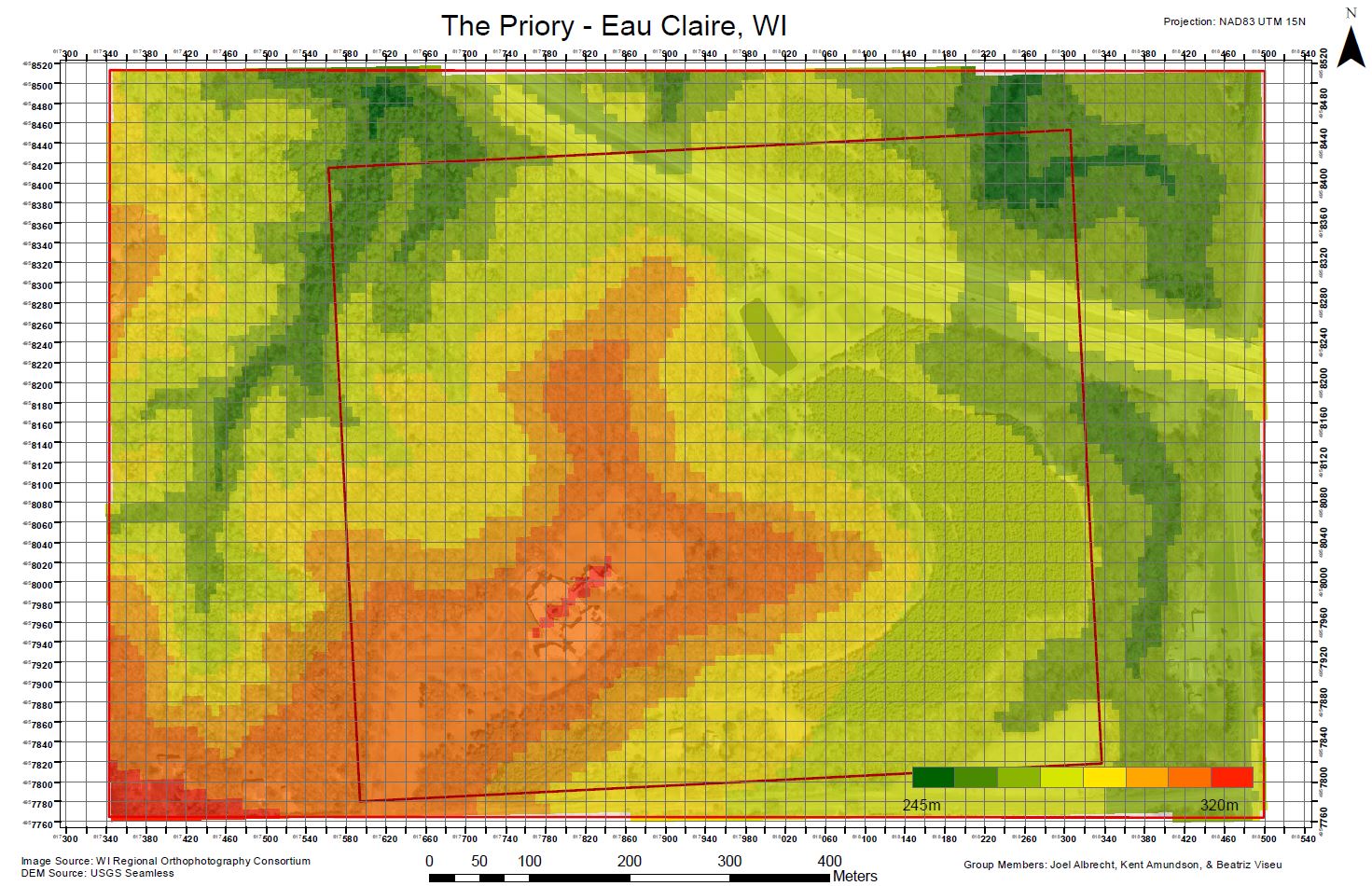
After completing my maps, it was time to meet with the group and decide which maps we wanted to use. We decided on using Joel's maps, as we all liked his use of the colored DEM to show elevation (Figure 3). His second map was also simple and clear, using just the 2-meter and 5-meter contours to show elevation (Figure 4).

Figure 3: Joel's first map that uses a transparent, color-coded DEM to show elevation, and the
orthoimage underneath to assist in visual referencing.

Figure 4: Joel's second map contains 2-meter and 5-meter contours for elevation, and
also shows the location of buildings and the pond.  A grid system with UTM coordinates
is also provided for navigation.

Conclusion

This assignment demonstrated the importance and necessity of ensuring all datasets being used are in the same coordinate system. At the same time it showed the malleability of cartography, which was seen in the differences in the maps each group member made. While the data being used follows strict guidelines, the map itself is a creative endeavor that can have many useful results.